Case study · Enterprise software · Sanitized per client confidentiality
Global Sales Enablement Curriculum Across 21+ Industry Verticals
A persona-driven curriculum teaching enterprise sales teams to position multiple product lines as one connected solution—built for a global enterprise cloud software vendor.
The problem
A global software vendor sells an interconnected portfolio—multiple product lines that solve different pieces of the same customer problem. New and existing sellers were treating each product as a standalone pitch, leading with feature lists instead of connecting products to a customer’s actual business need. The training had to teach positioning judgment, not just product facts, across dozens of industry verticals with genuinely different buyers and regulatory contexts.
Standing production constraints set by the client: strict source fidelity (no inference beyond approved source material), flagged gaps routed back to subject-matter experts rather than filled in, and formatting that had to survive unmodified inside the client’s LMS.
| Observed signal | Root cause | Performance gap | Recommended focus |
|---|---|---|---|
| Sellers default to a product demo on the first call | No shared framework for connecting a capability to a stated customer need | Deals stall in early discovery | Teach a needs-first discovery pattern before any product training |
| Reps treat three product lines as unrelated pitches | Products are taught in isolated, siloed modules | Missed cross-sell opportunities | One persona-driven customer story connecting all three products |
| New hires ramp slowly on vertical-specific positioning | Generic onboarding with no industry context | Extended time-to-productivity | Industry-vertical scenario library instead of one-size-fits-all training |
The instructional pattern
Each unit follows a repeatable structure: introduce a single fictional customer persona facing a realistic, evolving business challenge; introduce one product at a time only when the story creates a need for it; then step back and show how all the products fit one connected value story. The same "customer need → relevant capability → business value" scaffold repeats across every product so sellers build a transferable mental model instead of memorizing a new structure per product.
| Learning objective | Bloom’s level | Assessment method | Delivery modality |
|---|---|---|---|
| Identify which product answers a stated customer need | Understand / Apply | Scenario-matching check | Self-paced eLearning |
| Position a capability in customer language, not feature language | Apply / Analyze | Role-play, scored by manager rubric | Live coaching session |
| Synthesize all three products into one connected value story | Analyze / Evaluate | Situational-judgment exam item | Certification exam |
Production at scale
Storyboards were produced as structured Word documents so subject-matter experts and instructional reviewers could work in a familiar format, then converted to learner-facing, LMS-compatible layouts. A three-step discovery framework (listen for a signal, probe the operational impact, connect it to the right capability) is taught once and reinforced with a field-ready reference table sellers can use live on a call—a genuine job aid, not just review content.
| Term | What it means |
|---|---|
| Meridian Cloud ERP | Core finance and operations platform running on standardized, cloud-based best practices. |
| Unify Data Fabric | Connects data across the platform and third-party systems while preserving business context. |
| ProfitLens Analytics | Flexible calculation engine for complex profitability and allocation modeling beyond standard ERP. |
| What you hear | Think | Explore |
|---|---|---|
| “Upgrades are painful.” “We have too much customization.” | Meridian Cloud ERP | Modernization, standardization, continuous innovation |
| “Our data is fragmented across systems.” | Unify Data Fabric | Data quality, governance, analytics readiness |
| “Our spreadsheet models are hard to reconcile.” | ProfitLens Analytics | Calculation complexity, traceability, simulation |
Assessment items are written at the application/analysis level—situational judgment scenarios rather than recall questions—matching the audience of experienced sellers who need decision practice, not vocabulary drills.
This is the Cadence Framework’s Bridge beat in practice: the discovery framework taught earlier (listen → probe → connect) isn’t just described—it’s tested in a branching call scenario, with the trigger logic below showing exactly how a seller’s word choice routes to different coaching feedback.
Discovery Call: Maya Chen, CFO
“We already invested in Meridian last year. I don’t see why we’d need Unify Data Fabric on top of it right now.”
What do you say next?
Extending the pattern: a predictive consequence simulation
The discovery framework above (listen → probe → connect) is tested in the client build with a single graded decision. To push the format further, I built a companion prototype on my own time in Articulate Storyline: a three-decision discovery-call simulation where nothing is scored as simply right or wrong. Instead, each choice accumulates toward a single predicted business outcome, and the closing screen explains that prediction back to the learner in their own words—not a canned "correct/incorrect" message.
The screens below are real screenshots from the working .story file—not a recreation—since this is my own scenario (a fictional "Meridian Client" account) rather than client-owned content.
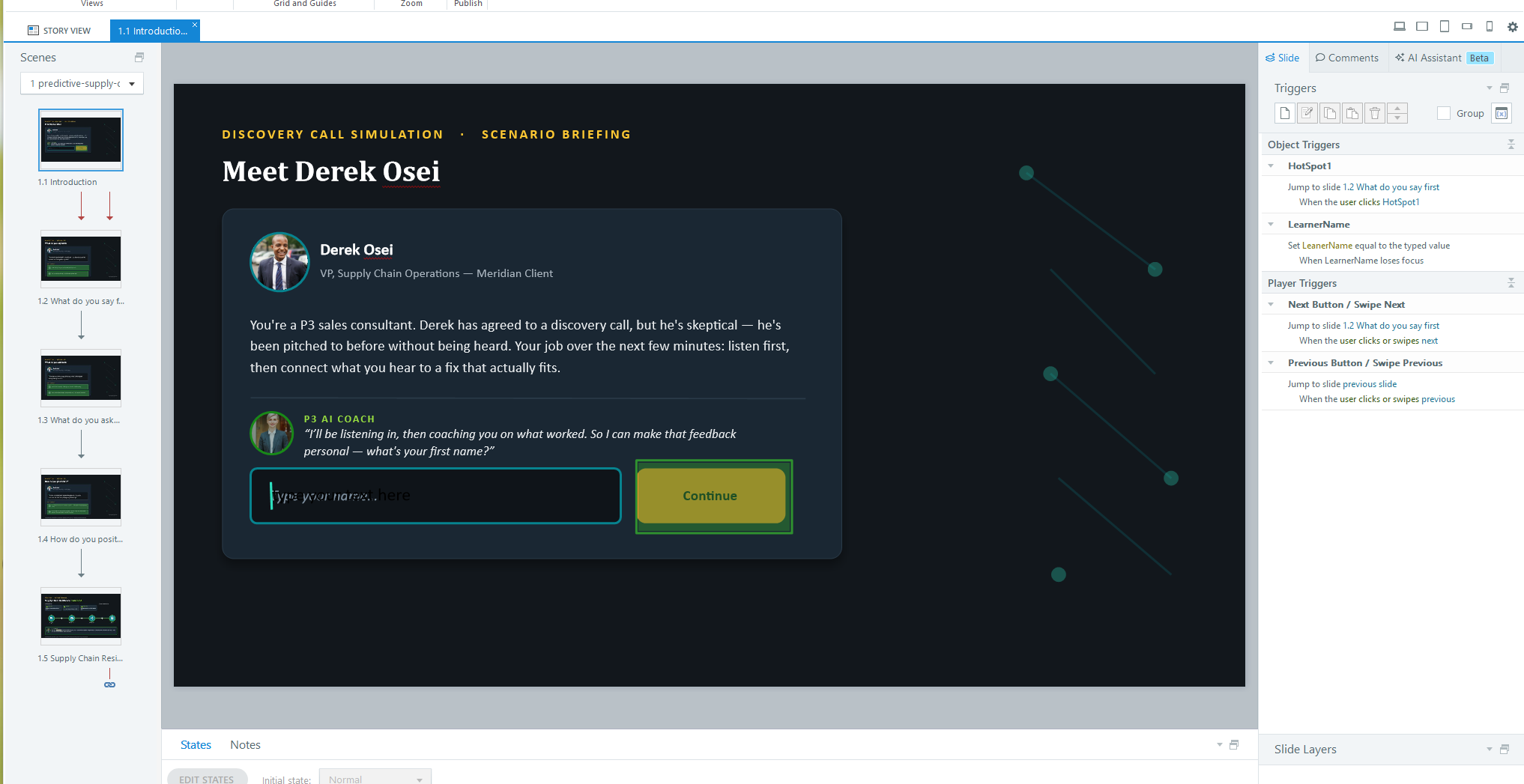
LearnerName text variable used later for personalized coaching feedback.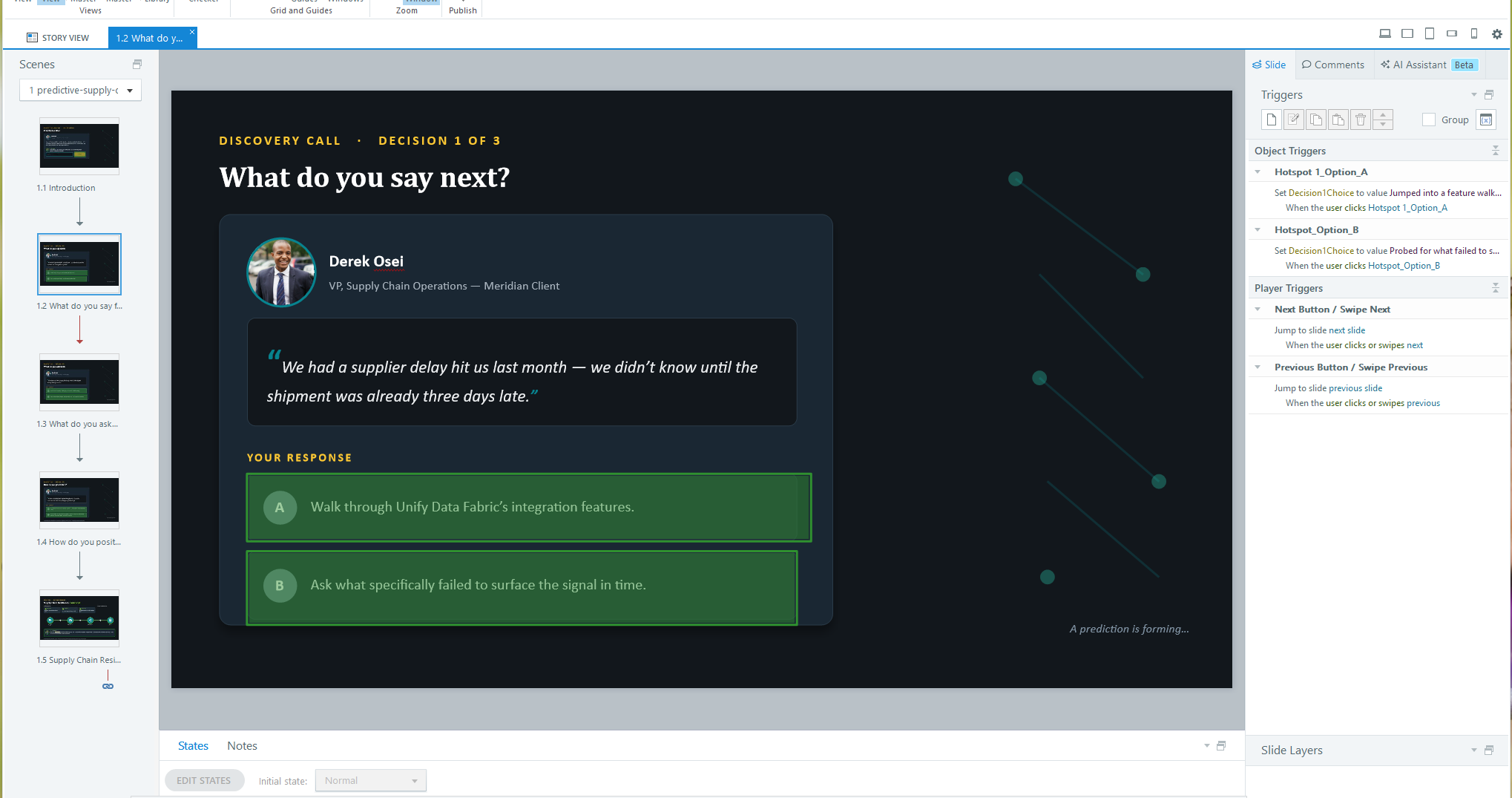
Decision1Choice.Variable architecture
Four variables carry the whole interaction:
| Variable | Type | Purpose |
|---|---|---|
LearnerName | Text | Captured once on the briefing screen; referenced live (Storyline’s Insert → Reference field, not typed text) in the coach’s dialogue so feedback reads as addressed to that person by name. |
Decision1Choice / 2 / 3 | Text | Each stores a short paraphrase of whichever option the learner picked, then is referenced back verbatim in a "Your Responses" recap on the closing screen—so the summary reflects the learner’s own path, not a generic report. |
DiscoveryScore | Number | The scoring engine. The stronger, discovery-first option on each decision adds 10 points; the weaker, pitch-first option adds 0—producing a 0/10/20/30 range across the three decisions. |
Branching & scoring logic
The three decision slides don’t brand any single option as "wrong" on-screen—both read as plausible things a seller might say. Underneath, each hotspot fires two triggers in a fixed order: first adjust that decision’s Choice variable and add to DiscoveryScore, then, on the final decision, evaluate the accumulated score to route to one of three outcome endings—Disrupted (0–9), Unchanged (10–19), or Enhanced (20–30)—so the ending reflects the compounding effect of all three choices, not just the last one.
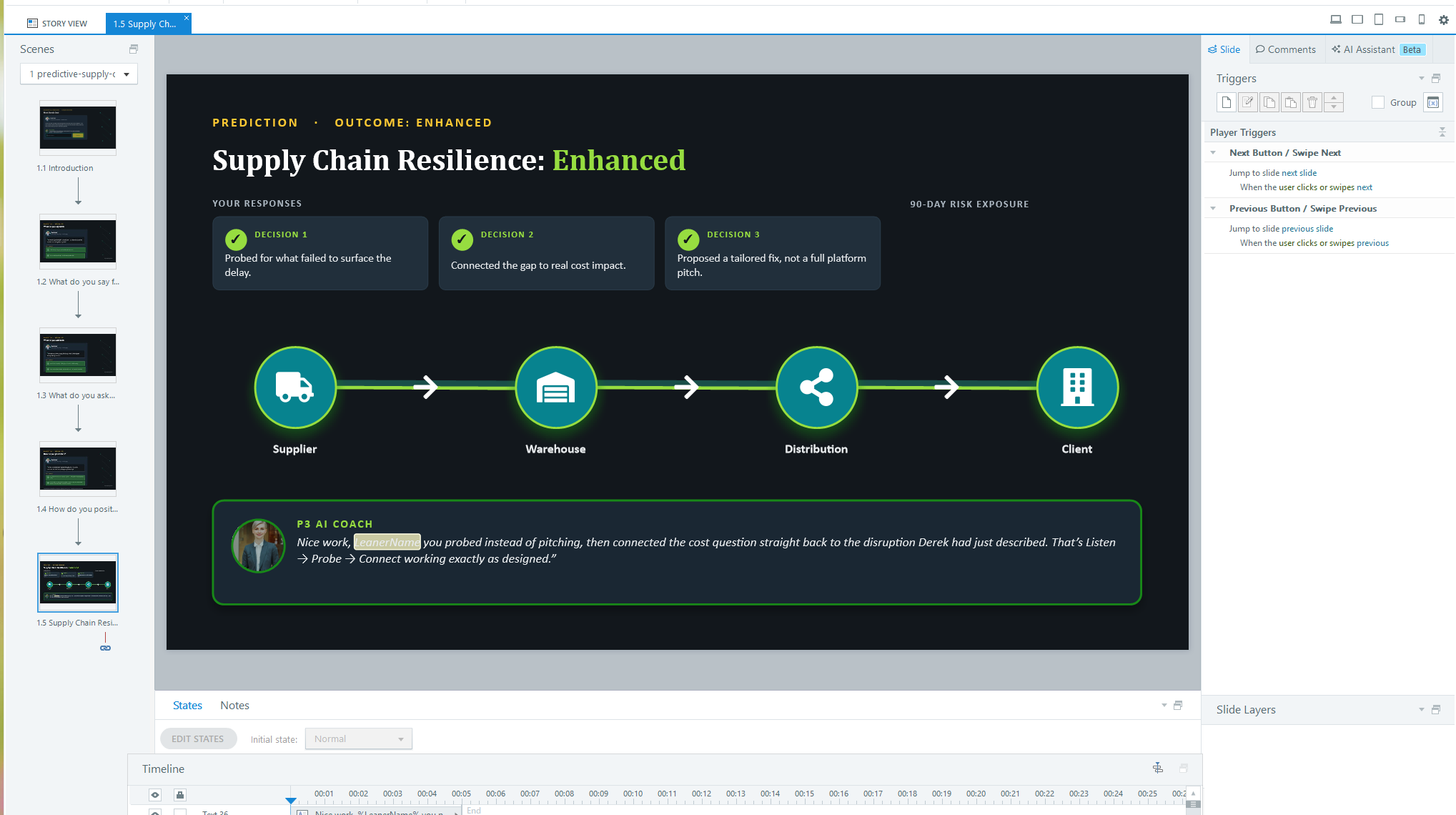
LearnerName variables set earlier—nothing on this screen is hand-typed per learner.Planned enhancement: an animated network visualization
The flow diagram on the outcome screen (Supplier → Warehouse → Distribution → Client) currently ships as static icons and connector lines, built natively in Storyline. The next iteration replaces that connector art with a Storyline Web Object—a small, self-contained HTML/JS page embedded directly on the slide—built with GSAP to animate a signal pulsing along the line in real time as the prediction resolves. Because a Web Object is just an embedded page, it drops in without touching any of the variable or trigger architecture above.
Rollout
Delivered across the client’s internal enablement platform to a global seller population spanning 21+ industry verticals, in phased waves rather than a single global launch—giving each vertical’s enablement leads time to localize examples before full rollout.
| Wave | Audience | Channel | Support |
|---|---|---|---|
| 1 | Vertical leads (initial industry) | Live virtual cohort | Manager talking points & FAQ |
| 2 | Full seller population, that vertical | Self-paced LMS module | Peer office hours |
| 3 | Additional verticals, phased | Train-the-trainer | Regional enablement leads certified to deliver locally |
Outcome
The approach was recognized internally as the client’s model for scalable, repeatable industry training—used as the pattern for extending sales enablement curriculum into additional verticals. The client’s overall learning ecosystem reached 3.4M active learners in 2025.
A regional bank CFO says, “We already have Meridian Cloud ERP and a BI tool. Why would we need ProfitLens?” Which response best reflects the product positioning taught in this unit?
| A | ProfitLens replaces both existing products for finance. |
| B | ProfitLens fills the complex-calculation and profitability-modeling role; the BI tool focuses on aggregated, forward-looking planning—the two work together. (Correct) |
| C | ProfitLens is only needed if the bank lacks a data warehouse. |